
Best tablets under Rs 20,000 to check out: A good tablet at this budget isn’t about chasing “perfect”—it’s about getting something that fits your life without feeling like a compromise. Whether you’re using it for notes, streaming, reading, or everyday browsing, the right pick should feel easy from day one.
Top 5 tablets under Rs 20,000 to consider on Amazon
These picks have been curated from Amazon to keep your shortlist clean and genuinely useful. It’s a tight list for smart shoppers who want value that feels obvious—without drowning in a hundred similar listings.
The 11-inch Android tablet space has become less about chasing the highest benchmark score and more about building a reliable “second screen.” Most tablets in this bracket are used in long, unglamorous stretches: streaming while cooking, reading PDFs in short bursts, handling video calls, or running two apps side-by-side while notes are taken. In that reality, display sharpness, brightness, speaker quality, and software stability tend to matter more than raw peak performance. A 2.5K panel is immediately noticeable when text is small; quad speakers change how watchable a tablet feels without headphones; and eye-care certifications are only useful when the screen is actually comfortable for longer sessions.
The smartest way to choose is to match the hardware to the setting. Indoor-only use can prioritize resolution and speakers, while travel and campus life benefits from cellular options, expandable storage, and a build that feels manageable in a bag. The five models below cover the main buyer types: those who want the crispest screen for the money, those who want ecosystem polish and notes, those who want strong multitasking, and those who want pen support without stepping into premium pricing.
Lenovo Idea Tab Smartchoice

Lenovo Idea Tab Smartchoice is built around a high-resolution screen and practical day-to-day specs: an 11-inch 2.5K (2560×1600) display with 500 nits brightness and anti-reflection treatment, paired with a MediaTek Dimensity 6300 chipset. The configuration listed here is generous for the segment at 8GB LPDDR4x RAM and 256GB UFS 2.2 storage, plus quad speakers tuned with Dolby Atmos and a 7040mAh battery. Specs like 12 hours of YouTube streaming and an in-box 20W adapter point to a “steady all-day tablet” rather than a short-burst device.
Pros
- 2.5K resolution at 11 inches is a real upgrade for reading and split-screen work
- 8GB/256GB configuration makes multitasking and offline downloads easier
- Battery size aligns with Lenovo’s 7040mAh-class all-day positioning
Cons
- On-board storage cap can matter for heavy offline media collectors
- Long-term software support can vary by model and region (worth checking before buying)
Pro-tip
- Anti-reflection screens feel best when brightness is kept moderate; max brightness can still produce reflections if the environment is harsh.
Samsung Galaxy Tab A11+
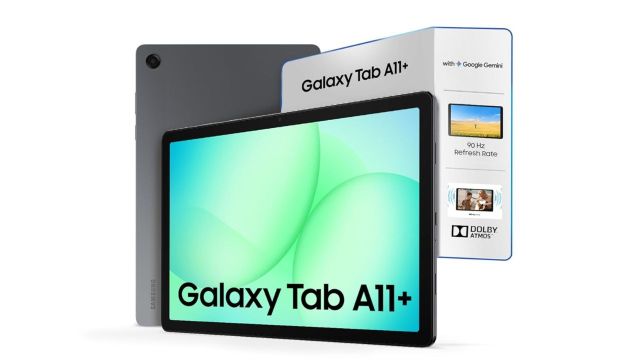
Samsung Galaxy Tab A11+ leans into “everyday reliability plus software convenience.” It pairs an 11-inch WUXGA (1920×1200) 90Hz TFT display with a MediaTek MT8775 chipset, up to 8GB RAM/256GB storage, and expandable storage up to 2TB via microSD. It runs Android 16 with One UI 8 and is backed by a 7040mAh battery with 25W charging, with optional 5G variants depending on SKU. This is the option that tends to suit students and planners, largely because Samsung’s Notes ecosystem and UI features can add practical value beyond the spec sheet.
Pros
- Expandable storage up to 2TB is the most flexible approach here
- Android 16 + One UI 8 is a strong everyday usability advantage for many users
- 90Hz refresh rate improves scrolling feel in reading, browsing, and long documents
Cons
- 1920×1200 is fine for entertainment, but less crisp than 2.5K panels for dense text
- TFT panels can look less contrasty than some IPS implementations, depending on tuning
Pro-tip
- For note-heavy routines, storage expansion matters more than most people expect; lecture videos, PDFs, and downloads add up quickly.
OnePlus Pad Go
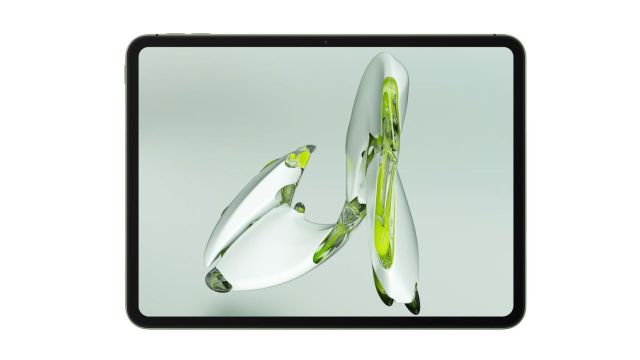
OnePlus Pad Go is positioned as a multimedia tablet with unusually strong codec support for this bracket. It uses an 11.35-inch class display (2408×1720), a MediaTek Helio G99 chipset, 8GB LPDDR4X RAM, and up to 256GB UFS 2.2 storage with microSD expansion up to 1TB. Battery is listed at 8000mAh with 33W SUPERVOOC charging, and audio is built around quad speakers with Dolby Atmos. For many buyers, the best part is the “balanced middle”: a sharper-than-FHD display, strong battery, and a software layer that supports practical multitasking.
Pros
- Solid battery/charging combo: 8000mAh + 33W charging
- Resolution is a step above FHD, which helps for reading and split-screen
- Storage expansion up to 1TB keeps it flexible for offline content
Cons
- Helio G99 is efficient and capable, but not a gaming-first chipset
- Cross-device perks are strongest for those already using OnePlus phones (otherwise it’s still a good tablet, just less “connected”)
Pro-tip
- For streaming-heavy use, codec support can matter for compatibility across devices; when in doubt, focus on stability and speakers.
Also Read: Versatile Electric Pressure Cookers For Daily Cooking
OnePlus Pad Lite
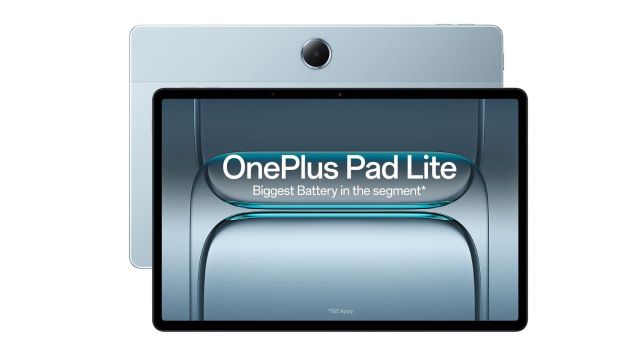
OnePlus Pad Lite is the straightforward “big battery, everyday display” option: an 11-inch FHD+ (1920×1200) 90Hz LCD panel with up to 500 nits brightness, a MediaTek Helio G100 chipset, and 6GB/8GB RAM options with 128GB UFS 2.2 storage. It runs Android 15 with OxygenOS 15.0.1 and carries a 9340mAh battery with 33W charging, plus quad speakers and optional 4G LTE. This is a good fit for buyers who want long runtime and a responsive screen without paying for higher resolution.
Pros
- Very large battery claim (9340mAh) suits long sessions away from a charger
- 90Hz makes the interface feel smoother than 60Hz tablets in the same price range
- Optional LTE supports campus and travel use without hotspot reliance
Cons
- FHD+ at 11 inches is adequate, but less sharp for small text than 2.5K panels
- Heavier weight can matter for handheld reading over long periods
Pro-tip
- For comfort, weight matters more than most buyers expect; using a stand or keyboard case can improve daily usability immediately.
Redmi Pad 2 Wi‑Fi + Cellular

Redmi Pad 2 Wi‑Fi + Cellular is the most feature-dense option in this set for buyers who want a high-res display plus pen support and strong connectivity options. It pairs an 11-inch 2.5K IPS panel (2560×1600) with a 90Hz adaptive refresh rate, claims up to 600 nits brightness outdoors, and supports an active stylus (sold separately). The tablet is listed with a 9000mAh battery and 18W charging (with a 15W in-box charger noted), plus expandable storage up to 2TB and cellular variants with dual-SIM 4G. It also leans into newer software features via HyperOS 2 and Android 15, including Circle to Search and Gemini support.
Pros
- 2.5K + 90Hz display specs make reading and media feel sharper and smoother
- Stylus support is a practical advantage for notes, markups, and sketching
- Cellular and storage expansion options support travel and long-term use
Cons
- 18W charging can feel slow next to 25W/33W competitors in daily top-ups
- Pen sold separately changes the true cost for note-takers
Pro-tip
- Stylus use works best when it’s planned upfront; budgeting for the pen and a matte or paper-like protector avoids a “buy now, add later” regret.
Frequently Asked Questions
Which tablet suits reading, PDFs, and study notes best?
Higher resolution makes dense text easier on the eyes, which favors the 2.5K options. For structured note-taking and organization, Samsung’s software features and Notes ecosystem can outweigh raw resolution for many learners.
Is 90Hz actually useful on a tablet?
It is most noticeable while scrolling through long documents and web pages, where motion looks smoother and further the interface feels more responsive. For video watching, speaker quality and brightness often matter more than refresh rate.
How important is expandable storage in real use?
It becomes essential once offline video, large PDFs, and long-term downloads are involved. Models with up to 2TB microSD expansion are better suited for “keep everything on device” habits.
When does Wi‑Fi + Cellular make sense?
Cellular matters for campus life, travel, or work routines that regularly move between locations without dependable Wi‑Fi. For mostly home use, Wi‑Fi only is usually enough, with hotspot as a backup.