
Ultrahuman app has a lot of features, not everyone will have to use all of them. Someone looking to learn more about their sleep habits may not need to track migraines, and someone tracking their period may be more interested in insights into ovulation than recommendations for caffeine. This is where Ultrahuman’s PowerPlugs come into the picture.
PowerPlugs are additional capabilities that work with the health data collected by the Ultrahuman ecosystem. You can activate the ones that match your interests and leave the others alone. Some are relatively straightforward additions to the app, while others bring in specialist technology or use information from connected devices and services.
The range has grown considerably, covering everything from sleep timing and caffeine consumption to heart rhythm, respiratory health and medical records. Here is a closer look at what is available and what each PowerPlug brings to the table.
Free PowerPlugs: Everyday insights without an additional subscription
Some of the most practical PowerPlugs deal with habits that affect everyday health. The Caffeine Window, for instance, looks at your sleep and wake time to suggest when you should have your last coffee. Log your caffeine intake and it estimates how much remains in your system, adjusting the cut-off to help protect your sleep.
Phase Alignment takes a slightly different approach to daily routines. It uses your circadian rhythm to suggest when to get daylight, move around, exercise or wind down. The Vitamin D PowerPlug estimates vitamin D production from sunlight using information such as your skin type, location and local UV index.
For menstrual health, Cycle & Ovulation uses skin temperature, HRV and resting heart rate to estimate a seven-day fertile window. It accounts for individual biomarker patterns rather than assuming everyone follows a standard 28-day cycle. Pregnancy Insights adjusts sleep, recovery and strain targets across the three trimesters, recognising that the body’s usual baseline changes during pregnancy.
There are a few features that address less obvious parts of daily life, too. Smart Alarm aims to wake you during a lighter sleep phase within a window you set. Social Jetlag looks at the difference between your weekday and weekend sleep schedules, while New Parent adjusts recovery and sleep scoring for the interrupted nights that come with caring for a newborn.
Screentime provides guidance around screen use, with tighter limits during sensitive periods such as immediately after waking, before bedtime and during recovery windows. Shift Work, meanwhile, adapts sleep and recovery guidance for people working changing schedules, including suggestions around light exposure and sleep timing.
Premium PowerPlugs: More specialised health tracking
The premium range includes several features that use specialist algorithms, additional analysis or connected services.
AFib Detection uses FibriCheck technology to screen overnight heart rhythms for atrial fibrillation and atrial flutter. It generates a report that can be reviewed each morning. The underlying algorithm is CE-marked and FDA-cleared, although availability depends on the country.
Cardio Adaptability looks at changes in overnight heart rhythm to assess how well your cardiovascular system is coping with stress. It tracks different levels of adaptability over time, giving you a longer-term view rather than relying on one night’s reading.
For menstrual health, Cycle & Ovulation Pro goes beyond estimating the fertile window. Powered by OvuSense technology, it is designed to confirm whether ovulation has occurred and identify anovulatory cycles. It also includes Cycle Flags and reports that can be discussed with a healthcare professional. In markets where the medical-device version is not approved, it is offered as Cycle & Ovulation Plus, with the same features described in wellness terms.
Respiratory Health brings together Sleep Cycle’s audio analysis and the Ring’s physiological measurements. It can identify periods associated with snoring, coughing and breathing disruptions, then show how heart rate, HRV and movement responded around those events.
Another addition is Jade Pro, an AI health coach that can interpret information across connected Ultrahuman products, including Ring data, Blood Vision, glucose and Home. Members can use its standard mode for everyday questions or Deep Research for responses supported by published research.
PowerPlugs for specific health needs and connected experiences
Some PowerPlugs are aimed at people dealing with particular health concerns or following specific routines.
Migraine Insights, developed with Click Therapeutics, examines the 72 hours of Ring data surrounding a logged headache. It looks for patterns involving sleep, HRV, recovery and menstrual cycles, alongside an eight-week programme of short educational lessons. It is currently available in India and the UAE.
The GLP-1 PowerPlug is intended for people taking GLP-1 medication. It tracks changes in metrics such as resting heart rate, HRV, sleep, glucose and blood results, helping users understand how these measurements change during treatment.
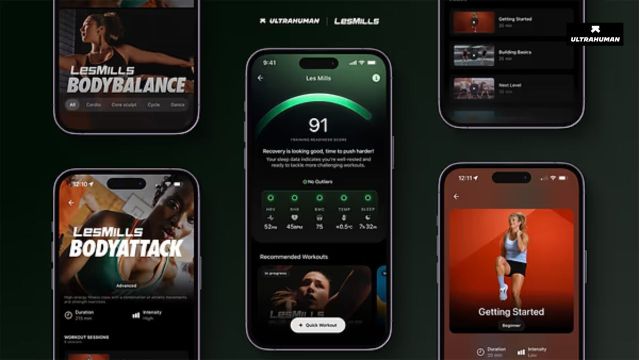
For people who prefer guided exercise, Les Mills connects recovery information with workouts from the Les Mills library. It recommends sessions based on morning recovery and records workout information, including heart-rate zones, calories and session statistics.
There are also PowerPlugs that connect health tracking with the wider environment. Tesla Sync brings driving information from a Tesla into the Ultrahuman app and can adjust cabin temperature, music and lighting according to recovery state.
HealthEx takes a different route by connecting medical records with continuous Ring measurements. Diagnoses, prescriptions and lab results can appear alongside sleep, skin temperature, HRV and recovery information. It can also flag potential follow-up tests or questions to discuss with a doctor.
How to install Ultrahuman PowerPlugs
PowerPlugs can be accessed through the Ultrahuman app. Open the app and head to the PowerPlugs section from the dashboard. Browse the available features, select the one you want to use and follow the activation instructions.
Some PowerPlugs are free, while others require a separate subscription. Availability can also vary depending on your location, particularly for features involving regulated medical technology.
It is worth remembering that not every PowerPlug will be relevant to every member. A person working night shifts may get more out of Shift Work, while someone interested in understanding their menstrual cycle may find Cycle & Ovulation more useful. The advantage of having these additions in one ecosystem is that you can build around the health information you actually want to follow, rather than filling the app with features you are unlikely to use.
Also Read: Why Businesses Are Paying More Attention to the Software Their Customers Never See