If you’ve never used Skyscanner before, the easiest way to think about it is this: it’s not the place where you book your trip. It’s the place where you figure out where the best deal actually is.
A lot of people land on the site expecting it to work like a travel agency. That’s not really what it does. Skyscanner scans prices across airlines, hotel booking platforms, and car rental companies, then shows you what’s available. Once you pick something, it simply sends you to the company that’s selling it.
It’s basically the comparison step of travel planning, but done in one place instead of ten different tabs.
Here’s how each part works when you’re using it for the first time.
Flights: the part most people use first
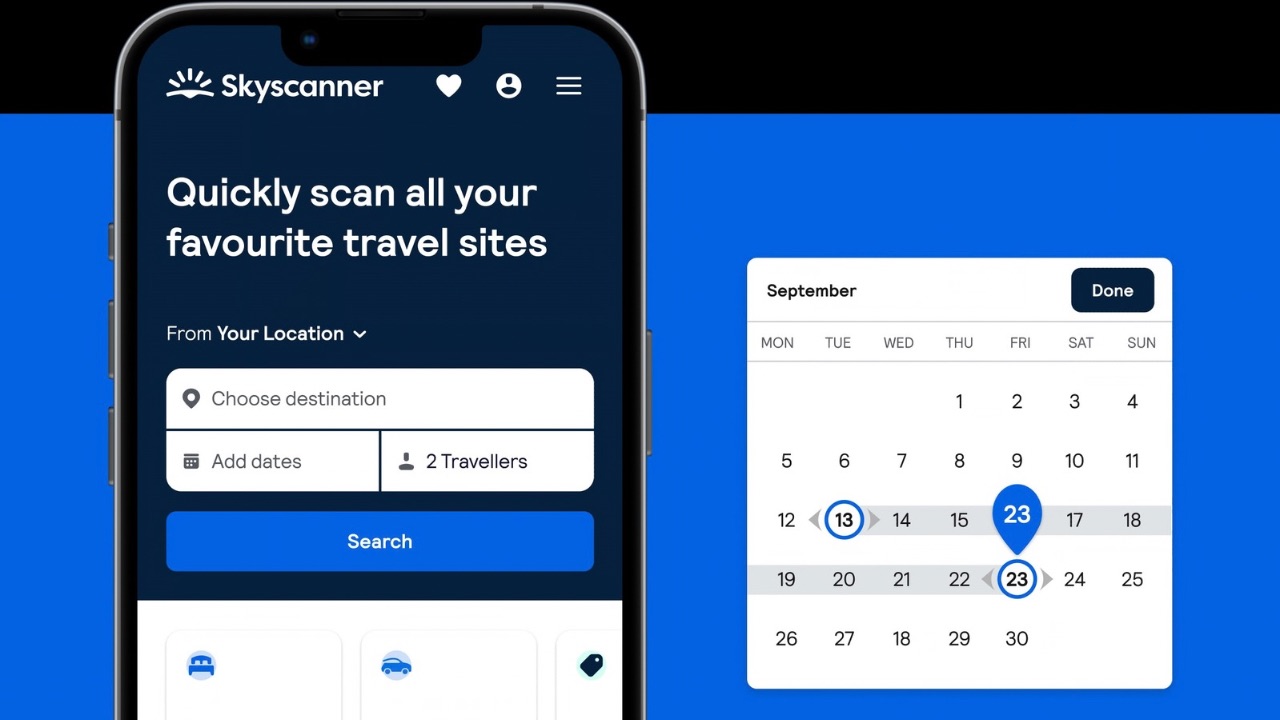
For most travelers, flights are the starting point. You open the site, type in where you’re flying from, where you want to go, and the dates of your trip.
After you hit search, Skyscanner starts pulling in results from airlines and travel booking websites. Within a few seconds you’ll see a list of flights with details like price, travel time, and whether there are layovers.
At the top of the results page you’ll notice three options: Best, Cheapest, and Fastest.
The “Best” option is what Skyscanner thinks is the most balanced choice. The cheapest flight might involve a long stop somewhere along the way, while the fastest one might be noticeably more expensive. The default setting usually sits somewhere in the middle.
If the list looks too crowded, the filters help a lot. You can remove flights with multiple stops, choose specific airlines, or narrow down departure times. A couple of small adjustments usually cuts the list down to something manageable.
Now here’s the part that confuses a lot of beginners. When you click on a flight, Skyscanner doesn’t sell the ticket. Instead, it sends you to the airline’s website or a booking platform where the purchase actually happens.
Hotels: where the comparison helps
Once flights are sorted, the next step is usually finding somewhere to stay.
Switch to the hotel tab and enter your destination, travel dates, and the number of guests. Skyscanner then pulls accommodation listings from different booking websites and then shows them together.
You’ll see a mix of hotels, apartments, and sometimes even smaller guesthouses depending on the city.

One thing that helps a lot here is changing the sort order. Many travelers prefer sorting by price first and then looking at the review scores. A cheap hotel can look appealing till the time you notice the reviews mentioning thin walls, noisy streets, or questionable cleanliness.
The map view is also surprisingly useful. A hotel might look like a bargain until you realize it’s on the outskirts of the city and further also requires a long commute to reach the main attractions.
When you pick a hotel deal, Skyscanner redirects you to the booking platform offering that rate so you can complete the reservation there.
Car rentals: useful if you plan to drive
Not every trip needs a rental car, but if you’re planning to explore outside the city, Skyscanner can help compare those options as well.
The process is very similar to the flight search. Enter the pickup location along with the dates and then the times you’ll need the vehicle. Skyscanner then searches rental companies operating in that area.
The results shown here include the type of car, the daily price, and the rental company providing it. You can also filter those results by vehicle size, transmission type, or other details if you’re looking for something in particular.
Once you are done choosing a rental option, you’ll then be redirected to the rental company’s site where the booking is then completed.
The redirect: where the booking actually happens
This is the one thing people often misunderstand when they use Skyscanner for the first time.
The platform itself doesn’t take your payment. It simply points you to the airline, hotel booking site, or car rental company offering the deal.
When you click “Select,” you’re leaving Skyscanner and going to that provider’s website. That’s where you enter your details, pay, and receive the booking confirmation.
Why people keep coming back to it
Once you’ve used Skyscanner a couple of times, the appeal becomes pretty clear. Instead of jumping between multiple travel sites just to compare prices, you can get a broad view of what’s available with a single search.
It doesn’t replace the actual booking websites, but it makes the comparison stage much easier. And when you’re trying to plan a trip without spending hours digging through travel sites, that convenience alone makes a big difference.