
Reaching the edges of the map—whether it’s a research station in the Arctic, a remote village in the Himalayas, or a Pacific island with a single landing strip—requires a different tactical approach. When a destination is truly isolated, the challenge isn’t just finding a flight; it’s identifying the “gateway” cities that actually make the journey possible.

For these hard-to-reach spots, Skyscanner acts less like a search engine and more like a regional mapping tool. Here is how to use it to solve the puzzle of remote travel.
1. Finding Your “Gateway” City

Most search engines ask where you are going. For a remote trip, you need to flip that. If you are trying to reach a place with limited service, use the “Everywhere” search in reverse.
By setting your “From” to the remote airport and your “To” to “Everywhere,” you can see which major hubs have direct or frequent links to that location. Once you identify that most flights to your destination funnel through a specific city—like Copenhagen for Greenland or Singapore for certain Pacific islands—you can plan the first half of your trip to that hub with much more flexibility.
2. Using “Nearby Airports” to Find Hidden Loops
Often, the closest airport to a remote destination is the most expensive and least reliable. By checking the “Add nearby airports” box, you might find that flying into a secondary hub a few hours away—followed by a local ferry, bus, or train—is significantly more efficient.
This is particularly true for mountainous regions or island chains where geography makes “direct” flying difficult. Widening the radius allows you to compare the cost and time of a complex flight versus a simpler flight combined with ground transit.
3. Stitching with the “Multi-City” Tool
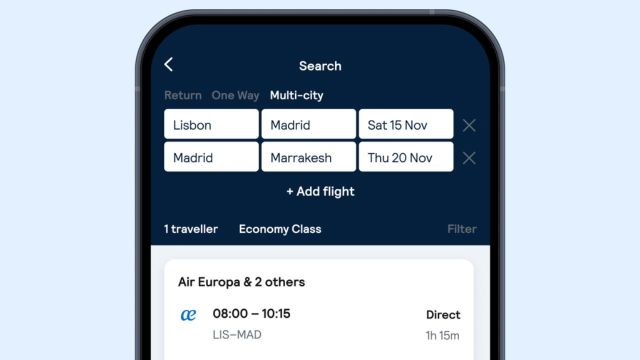
Remote travel often involves “unprotected” connections—trips that aren’t sold as a single ticket by a major carrier.
The Multi-City tool allows you to manually stitch together up to six legs of a journey. This is essential for reaching spots like the Faroe Islands or Central Asia, where you might need to combine a mainline international carrier with a small, specialized regional airline. By building the itinerary yourself, you can ensure you have a safe “buffer” of time between flights that a standard search might overlook.
4. Navigating Low-Frequency Schedules
Remote airports don’t have daily “commuter” flights; they often operate on a twice-a-week or seasonal basis.
The “Whole Month” view is the only way to effectively plan for these gaps. Instead of guessing dates and seeing “No flights found,” the month-long grid reveals the “rhythm” of the airport. You can see exactly which days the planes actually touch down, allowing you to anchor your entire trip around the airline’s limited availability rather than fighting against it.
5. The 2026 “Cheapest Destination Planner”
For travelers who want to go somewhere remote but are flexible on which “quiet corner” they visit, the new Cheapest Destination Planner (launched in early 2026) is a game-changer.
Instead of searching for a specific spot, you can select your preferred month and see a ranked list of the best-value destinations globally. For a remote traveler, this is a way to find those “off-the-map” locations that happen to be having a price anomaly or a new route launch, letting the data guide you to your next isolated escape.
The Takeaway
Reaching the ends of the earth is about logistics over convenience. By using reverse searches to find gateways and the Multi-City tool to bridge regional gaps, you turn a difficult journey into a series of manageable steps. It ensures you spend less time in a terminal and more time in the quiet of your destination.
Also Read: Sweaters for Women on Temu Greece That Keep It Easy From Morning to Evening