
Crossing several time zones is the fastest way to turn a dream vacation into a week of feeling like a zombie. We often focus on the “total travel time,” but for a long-haul trip, the arrival time is actually the most important data point. If you land at 6:00 AM after an overnight flight, you’re forced to fight sleep for fourteen hours. Land at 6:00 PM, and you can head straight to dinner and then to bed, resetting your internal clock almost instantly.
Managing jet lag isn’t just about drinking water and caffeine; it’s about choosing a flight that fits your biology. Here is how to use Skyscanner’s filters to navigate the chaos of time zones.
1. Using the “Departure Times” Filter to Control Arrival
The secret to beating jet lag is controlling when you land. Skyscanner’s sidebar allows you to filter by Departure and Arrival times, which is essential for “time-shifting” your journey.
If you are heading east (which is usually harder on the body), you want to avoid arriving in the morning. By sliding the “Arrival Time” filter to the evening window, you ensure that your first day in a new zone is short. You arrive, find your hotel, and sleep when the locals do. This simple filter can save you two days of grogginess.
2. Spotting the “+1” and “+2” Day Warnings
When looking at long-haul results, Skyscanner marks flights with a small “+1” or “+2” next to the arrival time. This indicates how many days you are “losing” or “gaining” to the clock.
For a freelancer or someone on a tight schedule, this is a vital indicator. A flight might look like it only takes 12 hours, but if it crosses the International Date Line, you might land two calendar days later. Checking these markers ensures you don’t accidentally book your hotel for the wrong night or miss a meeting because you forgot the world turns while you’re in the air.
3. The “Red-Eye” Strategy vs. Daytime Flights

Sometimes, the cheapest flight is an overnight “red-eye.” While this saves you the cost of a hotel night, it can be a disaster for your energy levels if you can’t sleep on planes.
You can use the Duration and Time of Day filters to seek out “daytime” long-haul flights. These flights leave in the morning and land in the evening of the same day. You stay awake the whole time, watch a few movies, and land ready to sleep in a real bed. It might cost a bit more, but the “value” of not being a ghost for the first 48 hours of your trip is huge.
4. Evaluating Layovers as “Reset” Points
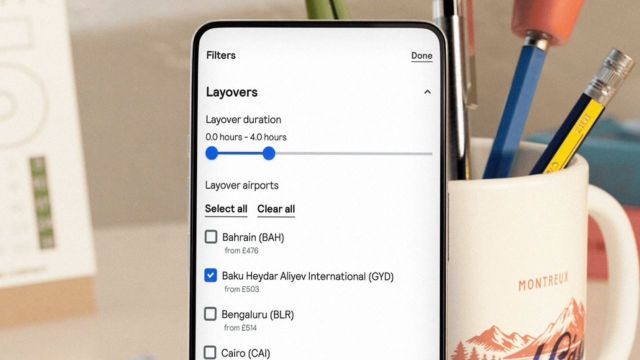
A long layover is usually seen as a negative, but when crossing eight or more time zones, a 12-hour stop can be a strategic “reset.”
By checking the Flight Details, you can see exactly how long you’ll be on the ground in a hub city. If you’re flying from India to the US, a long stop in Europe or the Middle East allows you to stretch, eat a proper meal, and begin adjusting to a mid-way time zone. It breaks the “circadian shock” into two smaller, more manageable shifts rather than one giant leap.
5. Choosing Modern Aircraft for Better Sleep
As mentioned in our earlier guides, the “Greener Choice” label often points to newer planes like the Airbus A350 or Boeing 787.
When it comes to time zones, these planes are game-changers. They feature “circadian lighting” systems that slowly shift colors to mimic sunrise and sunset, helping your brain start the adjustment process before you even land. They also have lower cabin altitudes and higher humidity, which reduces the physical stress that makes jet lag feel so much worse.
The Bottom Line
Beating jet lag starts at the booking screen, not the pharmacy. By using arrival time filters and targeting modern aircraft, you can choose a flight that works with your body instead of against it. The goal is to land feeling like a human being, ready to actually enjoy the destination you worked so hard to reach.
Do you prefer landing in the morning to “hit the ground running,” or are you firmly in the “evening arrival” camp to sleep the jet lag off?
Also Read: How Skyscanner Can Be Used for Travel Inspiration Even Without Booking